

Internal Linking for SEO: How to Strengthen the Right Pages
Internal linking is one of those SEO tasks that sounds deceptively simple.
Find a relevant phrase. Highlight it. Add a link to another page on your website. Repeat.
That might improve your website’s internal linking, but it doesn’t necessarily amount to an internal linking strategy.
A strategy requires you to make some decisions first:
Without that thinking, it’s very easy to spend hours adding links that are technically relevant but strategically unimportant. You might strengthen the wrong page, send mixed signals about overlapping content, or turn a useful article into a maze of unnecessary diversions.
The aim isn’t to add as many internal links as possible; it’s to create the right connections between the right pages. This guide will help you to understand what that means in practice.
- What is internal linking?
- What is an internal linking strategy?
- Why “add more internal links” is not a strategy
- Step 1: Decide which pages you want to strengthen
- Step 2: Check for competing or overlapping pages
- Step 3: Find pages that could support each priority destination
- Step 4: Evaluate which opportunities are actually worth using
- Step 5: Add the link naturally
- Step 6: Build a clearer structure around important subjects
- Step 7: Fix the internal links you already have
- Step 8: Make internal linking part of your content process
- Step 9: Measure what happens
- A practical internal-linking workflow
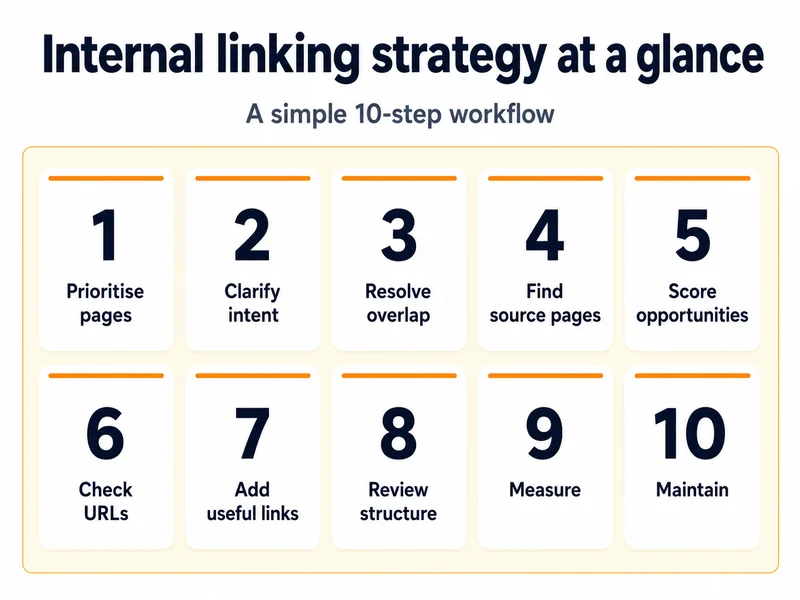
Internal linking strategy at a glance
The full guide below explains each stage in detail, but if you want to cut to the chase, this is the process in one view:
What is internal linking?
An internal link takes a visitor from one page on your website to another page on the same website. Internal links appear in many places, including:
They help visitors move around your website and find related information. They also help search engines discover pages and understand how your content is organised.
Google recommends creating a logical site structure, linking important pages from other relevant pages and using anchor text that’s concise and relevant to the destination.
The clickable words within a link are known as the anchor text. For example, in a link that says “read our guide to choosing an IT support provider”, the words “guide to choosing an IT support provider” are the best to choose as the anchor text.
That wording gives the reader some idea of what they’ll find when they click. It can also help search engines understand the subject of the destination page.
These are all good reasons to take internal linking seriously. The trouble begins when the advice is reduced to:
Find keyword mentions and turn them into links.
That’s a tactic. It’s not yet a strategy.
What is an internal linking strategy?
An internal linking strategy is a structured plan for deciding:
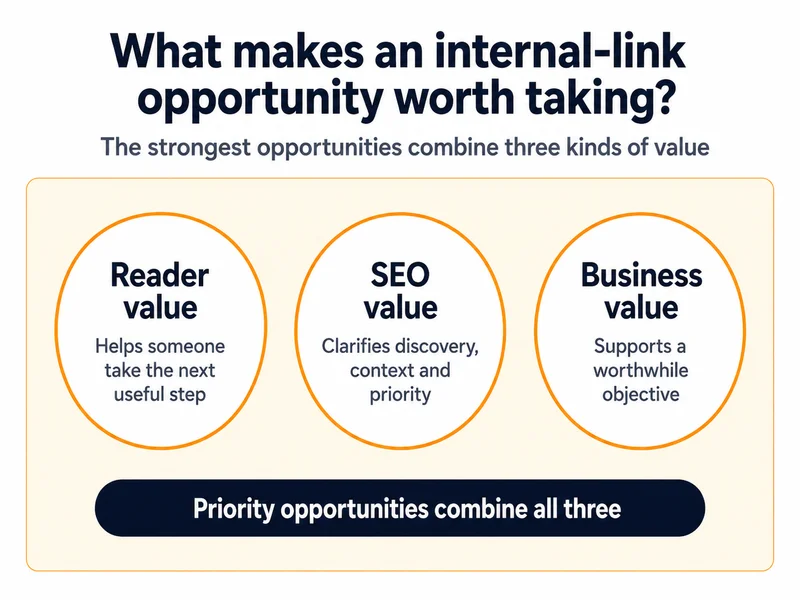
The strongest internal-link opportunities usually sit at the meeting point of three different objectives.
Value to the reader
The link helps someone answer their next question, understand the subject more fully or complete a task.
Value to search engines
The link helps search engines discover the destination, understand its subject and recognise how it relates to the rest of the website.
Value to the business
The link directs appropriate visitors towards a page that supports a worthwhile objective, such as understanding a service, comparing an option, making an enquiry or completing a purchase.
Not every internal link has to achieve all three objectives equally. For example, a privacy-policy link in the footer is necessary for legal reasons, but it’s unlikely to be an SEO priority. A link between two detailed help articles may be extremely useful to customers, without leading directly to a sale.
However, when you’re deciding where to focus a limited amount of SEO or content time, the best opportunities often deliver more than one type of value.
Why “add more internal links” is not a strategy
Most websites can benefit from improving their internal links. That doesn’t mean every page needs more links, or that every possible link is worth adding. Before you begin searching for opportunities, it helps to understand where the standard advice can go wrong.
Relevance is more than sharing a keyword
Imagine you have an article about the cost of outsourced IT support. A search of your website might find several other pages containing the words “IT support”, including:
All of those pages are related to the general subject. That doesn’t make them equally useful destinations from every paragraph.
The better question is:
What is the reader most likely to need next at this particular point?
For example, someone reading about prices might benefit from a link explaining what an audit includes. Later in the article, they may be ready to visit the service page.
A link to a technical checklist halfway through a pricing explanation may be relevant in the broadest possible sense, but it could still interrupt the reader rather than help them.
Keyword overlap can help you find possibilities. After that, human judgement is needed to decide whether the connection is genuinely useful.
Not every page deserves to be strengthened
Internal-linking tools frequently highlight pages that have few or no incoming internal links. These are often called orphan pages.
Some orphan pages have simply been overlooked. Perhaps a useful article was published but never linked from an older guide. Perhaps a new service page was omitted from the relevant content.
Others are isolated for a good reason. They might be:
If an orphan page crops up as a warning in a report, it should prompt you to make a decision, not create an automatic task.
Don’t begin by asking:
Where can we link to this page?
Instead, ask:
Is this page useful enough to keep, update and promote?
Sometimes, the best outcome of an internal-link review is to add a link. At other times, the right answer isn’t link-related at all; it’s to improve, merge, redirect or remove the page.
More links will not repair the wrong page
Internal links can make a strong page easier to find, and clarify how it fits into the wider website. They can’t turn a weak page into the best result for a competitive search.
Adding more links is unlikely to solve the problem when the destination:
Google groups duplicate or very similar pages around a chosen canonical version. Your internal links should normally point consistently towards the version you want treated as the main page, rather than distributing them between duplicate URL variations.
Internal linking supports a page. It doesn’t remove the need for that page to deserve visibility in the first place.
Step 1: Decide which pages you want to strengthen
A common internal-linking workflow starts by searching the whole website for phrases that could become links.
A more strategic workflow starts at the other end.
First, decide which destination pages matter most. These may include pages that:
You don’t need to tackle every page at once. For most small and medium-sized websites, choosing five to ten priority destinations gives you a more manageable starting point.
Questions to ask about each priority page
Before trying to increase the number of internal links pointing to it, ask:
This exercise can reveal that some supposed “priority pages” are not ready to be strengthened. That’s useful information. It’s better to discover the problem before directing more visitors and search-engine attention towards them.
A simple priority list
Let’s use our example IT business to demonstrate a way to think about and prioritise link opportunities:
| Page | Purpose | Intent | Business value | Opportunity | Priority |
|---|---|---|---|---|---|
| Managed IT support service | Generate qualified enquiries | Commercial | High | Receives impressions but few clicks | High |
| IT systems health-check checklist | Help businesses carry out an initial review | Informational | Medium | New page with few internal links | Medium |
| Old free IT health-check offer | Promote expired campaign | Commercial | Low | Outdated and isolated | Remove or redirect |
You aren’t trying to calculate a perfect numerical SEO value. The purpose is to make your reasoning visible.
Without this stage, internal-linking decisions tend to be led by whichever opportunities are easiest to find, rather than by which ones matter most.
Step 2: Check for competing or overlapping pages
Before strengthening a page, check whether it clearly owns its intended subject. This is particularly important on websites that have published regularly for several years. New content is often created without a full view of what already exists, leaving several pages covering subtly – or not so subtly – the same ground.
For example, a website might contain all of the following:
There may be a perfectly good reason for each page to exist. For example, a service page and an informational checklist serve different needs. But if several pages are trying to rank for the same search and make the same basic promise, adding more links between them will not necessarily create clarity. It may reinforce the confusion.
Look for signs of overlap
Potential warning signs include:
Decide what role each page plays
Each worthwhile page should have a reasonably clear job. It might be:
Once those roles are clear, the relationship between the pages becomes easier to build.
A broad guide might link to detailed articles. Those detailed articles might link back to the central guide, where readers need wider context. Informational content may link to a relevant service when the reader reaches a point where professional help is a logical next step.
Where two pages have no useful distinction, the solution may be to merge them, redirect one or reposition them around different needs.
You’ll notice from the examples above that several of the listed services are very similar. For example, “managed IT support” and “outsourced IT support” overlap greatly, so should probably be kept on the same page – this guide will help you decide when a service merits its own page on your site.
Internal linking should reinforce a clear content structure. It shouldn’t be used to disguise a structure that has never been properly resolved.
Step 3: Find pages that could support each priority destination
Once you know which page you want to strengthen – and why – you can begin looking for appropriate source pages. There are several useful ways to do this.
Search your own website
A simple Google search can uncover pages that mention the subject:
site:yourwebsite.co.uk “relevant phrase”
You could search for:
Don’t limit yourself to exact keyword matches. A page can provide a very useful link without using the destination’s target keyword. For example, an article about recurring IT downtime might naturally lead to a guide about diagnosing network performance problems.
The relationship is based on the reader’s needs, not merely repeated wording.
Review Google Search Console data
Search Console can help you identify pages that Google already associates with related searches.
Look at the queries generating impressions for your potential source pages. You may find that an article is appearing for searches connected to your priority destination, even though the page doesn’t use the exact phrase you expected.
You can also use Search Console’s Links report to see which pages currently receive the most internal links and which source pages link to a particular destination. Bear in mind that the Links report is not a complete inventory. Google describes it as a sample of the links it has found, and its tables may be truncated on larger sites.
For a more complete technical review, you may need a website crawler (I recommend Screaming Frog) or SEO auditing tool, such as Ahrefs.
Use SEO tools as a starting point, not an instruction sheet
Crawling and content-analysis tools can help identify:
This can save a great deal of time, particularly on a large website. However, software generally cannot judge:
Remember that a tool-generated opportunity is something to review, not something that must be implemented.
Review recently published and updated content
Every time a new page is published, ask two questions:
- Which established pages should this new page link to?
- Which existing pages should now link back to it?
The second question is often forgotten.
Writers usually add outgoing links while preparing the new content. Fewer people return to older articles and create the incoming links that integrate the new page into the site.
If you can make this a standard publishing task, it prevents valuable new content from being left in isolation.
Step 4: Evaluate which opportunities are actually worth using
At this point, you may have a long list of potential source pages.
This is where most generic internal-linking guides become vague. They tell you to add links from “relevant, authoritative pages”, but they don’t explain how to choose between dozens or hundreds of possibilities.
A useful linking opportunity should pass four tests.
1. Will it help the reader?
Ask:
A link shouldn’t exist just because a keyword happens to appear in the sentence.
2. Is the connection genuinely relevant?
Consider the specific relationship between the two pages. A general guide to hybrid working and a managed IT support service page both concern workplace technology, but that doesn’t make every link between them contextually strong.
The most useful connections are usually easy to explain:
When you can’t explain why the reader should follow the link, the connection may be too weak.
3. Is there a worthwhile SEO opportunity?
Relevant source pages may be particularly valuable when they:
The destination may be a good priority when it:
Bear in mind, these are indicators, not guarantees. A link from a popular article doesn’t automatically lift another page up the rankings. Internal links can help search engines discover and interpret content, but performance still depends on the quality, relevance and competitiveness of the destination itself.
4. Does it support a business priority?
A strong internal-linking plan should reflect what matters to your organisation.
Ask:
This last question is especially important on conversion-focused pages. For example, adding several links to explanatory articles from an enquiry or checkout page might create more routes through the website, but it may also divert people who were ready to act.
Internal linking has to work alongside the page’s purpose, not against it.
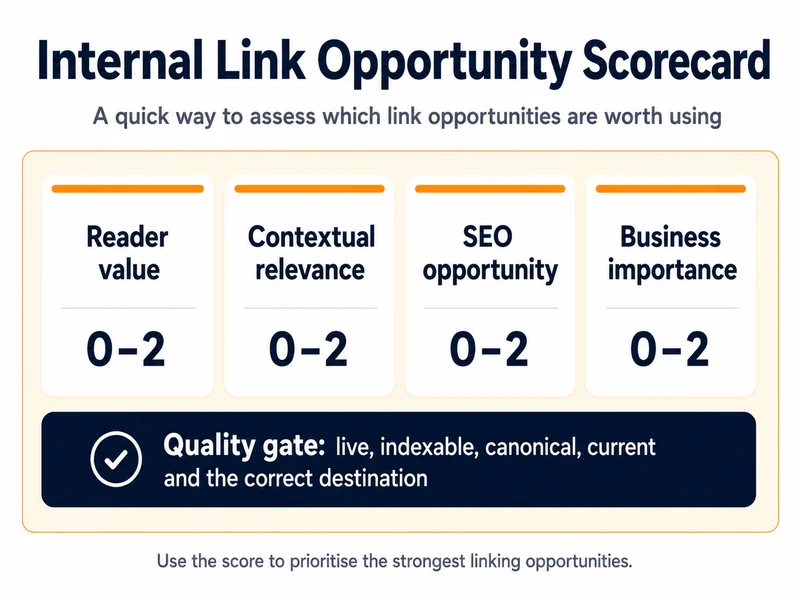
Use a simple scoring system
You can score each possible link from zero to two against the four tests:
| Test | 0 | 1 | 2 |
|---|---|---|---|
| Reader value | Little or no benefit | Possibly useful | Clear next step |
| Contextual relevance | Weak connection | Broadly related | Direct and specific |
| SEO opportunity | Little apparent need | Some potential | Strong source/destination opportunity |
| Business importance | Low priority | Supports a secondary objective | Supports a clear priority |
A link scoring seven or eight is likely to deserve attention before one scoring three or four. And scores below 4 would be a low priority.
This isn’t a scientific formula, and it shouldn’t be interpreted as one. It’s just a practical way to make consistent decisions when your audit has produced more possibilities than you can realistically implement.
Before approving any opportunity, also carry out a basic quality check:
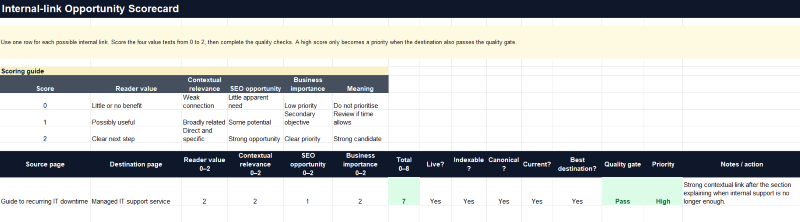
Download this useful Scorecard Template
This accompanying Excel worksheet provides you with a scorecard template to use with your own pages. It’s pre-formatted with automatic totals and priority flags to help you quickly determine the value and priority of a potential link opportunity.
Step 5: Add the link naturally
Once you’ve chosen an opportunity, the final wording and placement still matter.
Use clear, descriptive anchor text
The anchor text should give the reader a fair idea of what will happen when they click.
Compare:
The second is more informative because it describes the destination.
That doesn’t mean every anchor needs to contain an exact target keyword. Nor should every link pointing to the same page use identical wording. Different source pages will introduce the destination in different contexts, so some natural variation is to be expected.
Useful anchor text is:
Avoid twisting a sentence into an unnatural shape simply to include a particular keyword.
Google’s current guidance is similarly straightforward: anchor text should help both people and Google understand the linked page, and links should use crawlable HTML elements with a valid destination.
Give the link enough context
Sometimes the right phrase already exists within the page and can be linked naturally. At other times, the better approach is to add a short sentence explaining why the destination is useful.
For example:
“Several different types of IT support contract can appear similar at first. Our guide to managed IT support explains what is included and when it may suit a growing business.”
A reader would find that more useful than linking a passing mention of “managed IT support” without explaining why the additional guide is relevant.
Link to the best destination, not merely the first one you find
When several pages appear relevant, choose the one that most accurately meets the need created by the source page. Check that it is:
Above all, do not send visitors to an informational article when they clearly need a service page – or to a service page when they are still trying to understand a basic concept.
Don’t force it
Occasionally, you’ll find an apparently valuable connection but no natural place to add the link. That may mean:
Choosing not to add a weak link is part of a strategy too.
Step 6: Build a clearer structure around important subjects
Individual editorial links matter, but they should form part of a wider structure.
If your website has several pages covering an important topic, their relationship should be reasonably easy for both visitors and search engines to understand.
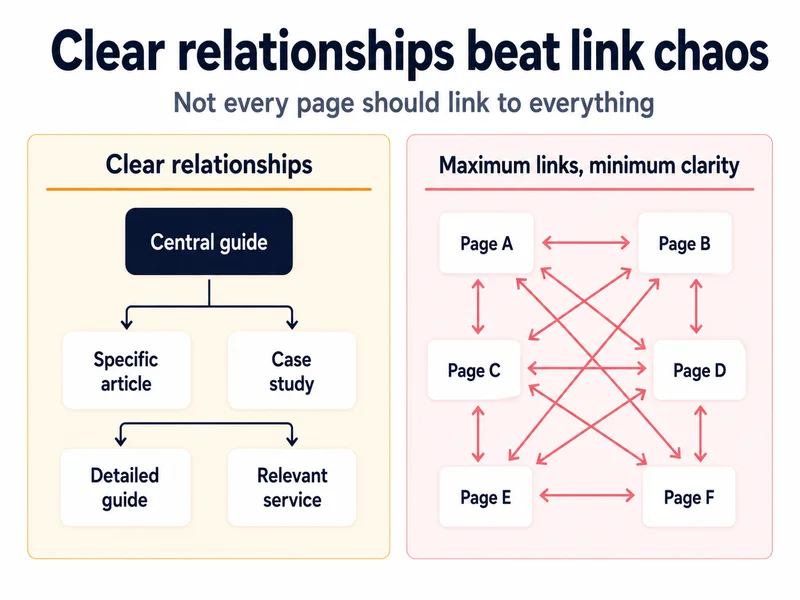
A typical structure might include:
The central guide can direct readers towards the detailed subtopics. The supporting articles can link back to the broader guide where more context is useful. They may also link laterally to closely related articles.
Informational pages can link to a commercial page where the service or product is a sensible next step – not simply because the business would like more people to visit it.
Do not build topic clusters mechanically
The idea of a “topic cluster” has become common in content marketing.
At its best, it encourages businesses to cover a subject thoroughly, and organise related information coherently.
At its worst, it becomes an instruction to publish a predetermined number of articles around every important keyword.
That can produce:
A useful topic cluster isn’t defined by how many pages it contains. It’s defined by whether each page serves a distinct need, and whether the connections between them help the reader navigate the subject.
Aim for clarity, not maximum connectivity
Every relevant page does not need to link to every other relevant page. Too many choices can make a page harder to read. They can also make the intended hierarchy less obvious.
Your most important pages should be easy to reach and appropriately supported. Less important pages do not need equal prominence.
Think of internal linking as signposting, not covering every wall with arrows.
Step 7: Fix the internal links you already have
An internal-linking strategy should not focus only on adding new links. Removing or correcting poor links can be just as valuable. During your review, look for:
You should also look at template-generated links in menus, filters, tags, sidebars and footers.
On a small service-business website, these are unlikely to create a serious crawling problem. On a large ecommerce, directory or publishing site, filters and faceted navigation can generate vast numbers of URL combinations.
Google describes faceted navigation as a common cause of excessive crawling, because search engines may continue discovering combinations of filters, sorting options and parameters.
That’s a more technical issue and may require developer support. The important principle is that making every possible URL discoverable isn’t always beneficial.
The aim is controlled, useful access to pages that deserve to be found.
Step 8: Make internal linking part of your content process
One-off internal-linking projects are useful, particularly when a website has accumulated years of content without a consistent process.
But the benefits will gradually erode if nothing changes about the way new content is published and maintained.
Internal linking should become part of the normal content workflow.
When publishing a new page
Before publication:
After publication
When updating an existing page
Review:
A page written three years ago may still perform well, but the best next step for its readers may have changed significantly.
During periodic reviews
Depending on the size and publishing frequency of your website, schedule regular checks for:
Someone also needs to own the process. That might be the marketing manager, content editor, SEO consultant or a shared responsibility between them. The exact arrangement matters less than making sure internal linking is not left to chance.
Step 9: Measure what happens
Internal linking isn’t always easy to measure in isolation.
You may update the destination content at the same time. Search demand may change. Competitors may improve their pages. Google may recrawl different parts of the site at different times.
That doesn’t mean you should make changes without recording or reviewing them.
Monitor the destination pages. Useful indicators include:
Don’t focus only on one headline ranking.
A page might begin appearing for a wider and more relevant range of searches before there is a dramatic change in overall traffic.
Monitor how people use the links
Where your analytics set-up allows it, consider tracking clicks on important contextual links. This can help you learn:
A link can be worthwhile even when its ranking effect can’t be isolated, particularly if it helps visitors find information and take an appropriate next step.
Keep an implementation record
A simple log might contain:
| Date | Source page | Destination page | Reason for link | Context or anchor | Review date |
|---|
This doesn’t need to become an administrative burden.
Its purpose is to distinguish a planned internal-linking project from a collection of edits that nobody can later remember or evaluate.
A practical internal-linking workflow
The complete process can be reduced to ten steps:
- Choose the pages that deserve greater visibility.
- Confirm the purpose and search intent of each page.
- Resolve unnecessary overlap with competing content.
- Find existing pages that could genuinely support each destination.
- Assess reader value, contextual relevance, SEO opportunity and business importance.
- Check that the destination is live, current, indexable and canonical.
- Add clear links where they fit naturally and helpfully.
- Review navigation and wider topic structure where necessary.
- Record the changes and monitor what happens.
- Repeat the process whenever content is published or updated.
Internal linking is about strengthening connections, not increasing link counts
Internal linking is important for SEO, but that doesn;t make every internal link valuable.
A strong strategy isn’t measured by the number of phrases you have turned into hyperlinks. It’s measured by whether:
The best internal links do more than move attention from one URL to another. They help make the structure, purpose and value of the whole website clearer.
If you’re unsure which pages your website should be strengthening – or whether overlapping content is weakening rather than supporting your SEO – an SEO audit can identify where the most valuable opportunities lie before you begin adding links.

About Mandy Cochrane
Mandy Cochrane is an independent SEO consultant with more than 15 years’ experience helping businesses improve their visibility in search. She specialises in SEO audits, strategy and content, with a practical, plain-English approach that helps businesses understand what needs fixing, what matters most and where their time and budget will have the greatest impact.
Connect: