

Should you delete, redirect or retain zero-traffic web pages?
Auditing your website content regularly is a good way to keep your site lean and useful; it improves crawl efficiency, boosts your visitors’ experience on-site, helps you maintain a tightly focused content strategy, and strengthens your site authority.
And with every audit you’ll probably discover pages that receive no traffic, or very low traffic. The question I’m often asked is: should you delete them?
In this guide I’ll set out the factors you should consider in this situation, potential alternatives to page removal, and a checklist to help you decide what action to take.
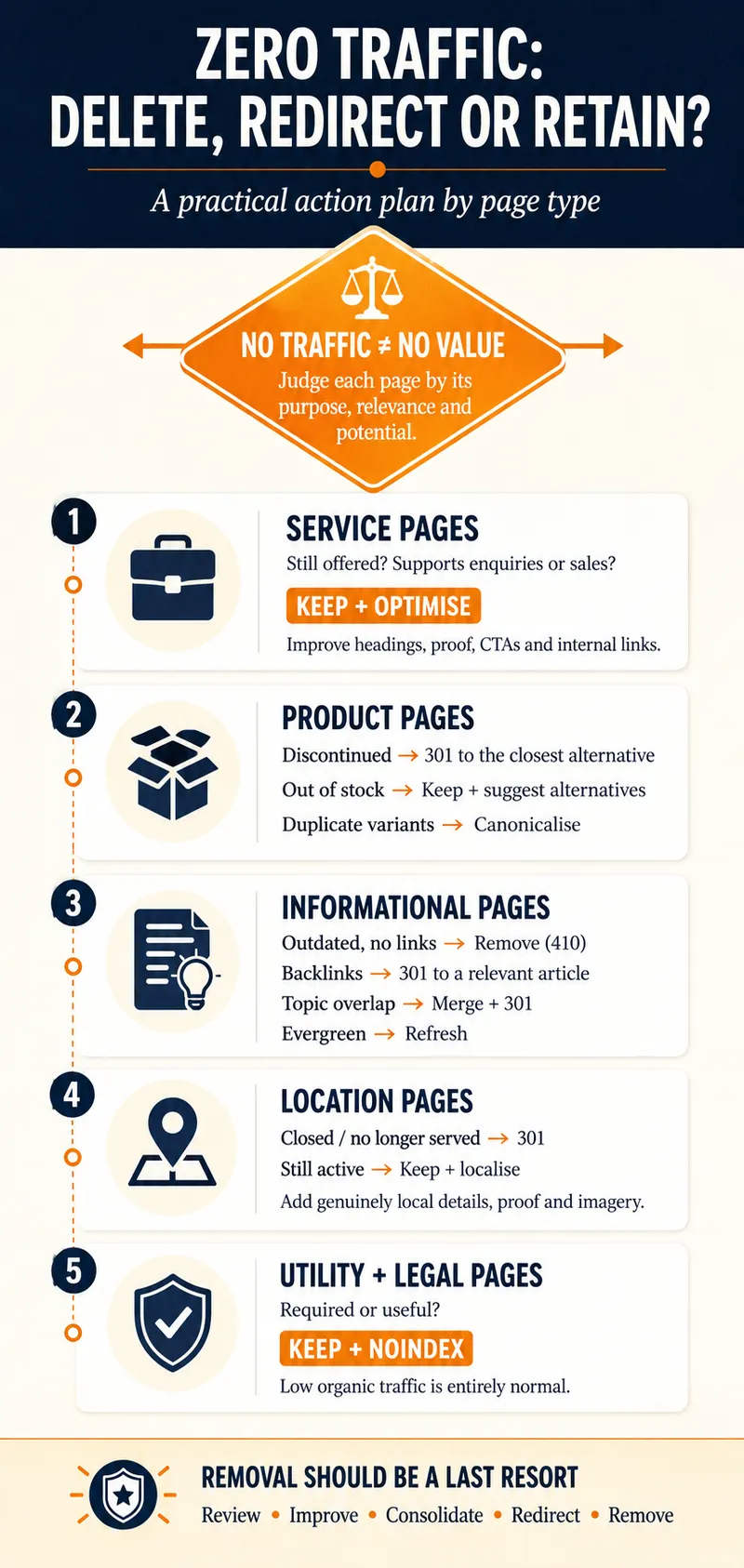
Scan the infographic below for a fast, visual decision-making flowchart, then move to the relevant sections below for more details.
Removal should be a last resort
My recommendation is generally that deleting pages with insignificant or no traffic should be a last resort; snap judgements based solely on traffic volume can harm your SEO and potentially impact business conversions.
That’s because a no-traffic page isn’t necessarily a no-value page – a page that targets a niche topic or keyword might reach far fewer users, but still convert profitably to the right person.
Other options for low-traffic pages
Removal isn’t your only option. In some situations, it might be sensible to:
Options for different types of content
And the decision-making doesn’t end there: your action plan may differ between different types of content, for example, service, product, or informational pages.
Here’s a comprehensive checklist, organised by content type, to guide your decision-making process for zero- and low-traffic pages.
Service Pages
Core business pages should almost never* be deleted, even with zero traffic, as they establish your business services and capabilities.
(*The only time you might consider removing a service page is if it overlaps significantly with another, closely related service page. You can use this guide to help you decide when a service should have its own web page.)
Product Pages
E-commerce items with no traffic usually suffer from poor search visibility, seasonal fluctuations, duplication issues or obsolescence.
Blog Posts and Informational Content
Articles or other types of informational pages are always prime candidates for content pruning, updating, or consolidation.
Location Pages
Location pages represent physical branches or service areas for your business. They must remain accurate for local SEO, especially your Google Business Profile.
Utility & Legal Pages
Privacy policies, terms of service, and internal login pages will naturally get little to no organic traffic, but they are required.
Final thoughts
Above all else, managing your site content should be a thoughtful evaluation based around each page’s purpose and goals, the value it adds, and the potential value it could have. Look beyond standalone metrics such as session counts before deciding whether to keep, improve, redirect or remove it.
Get in touch if you’d like help turning a content audit into decisions based on a clear and actionable content strategy.

About Mandy Cochrane
Mandy Cochrane is an independent SEO consultant with more than 15 years’ experience helping businesses improve their visibility in search. She specialises in SEO audits, strategy and content, with a practical, plain-English approach that helps businesses understand what needs fixing, what matters most and where their time and budget will have the greatest impact.
Connect: